

What changed
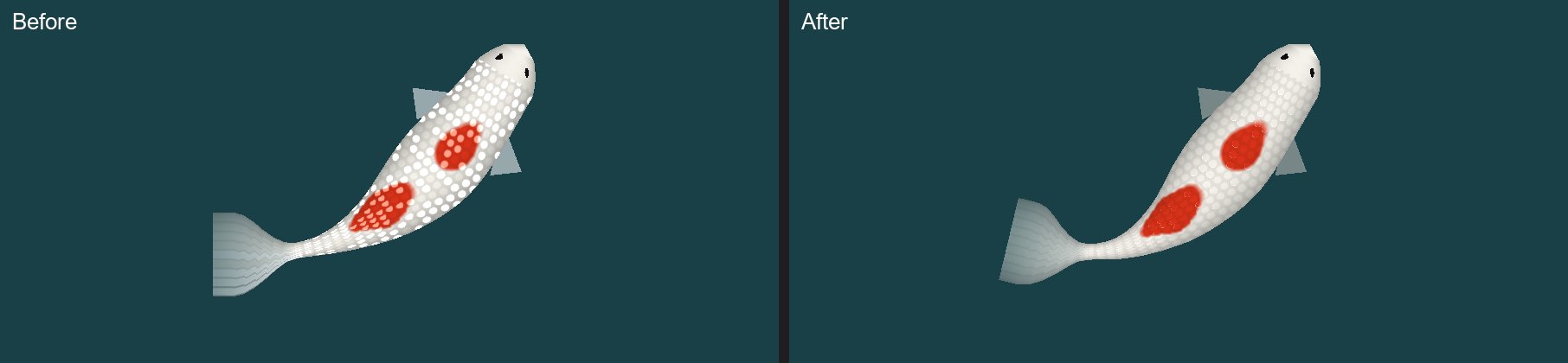
- Before: about 60% of scales (150 of every 256) were filled with a white dot, brightest in the middle of the scale. At gallery and blog size, the koi looked spotted.
- After: about 35% of scales (90 of every 256) get a thin crescent of light on their rear rim, the tail-side edge, and a faint shadow on the front rim. It is strongest along the back and fades toward the flanks, where light from above would not reach.
Why
Ginrin (gin = silver, rin = scale) koi have reflective scales that flash as light catches their edges. The look is a glitter on the edges, not a pattern of dots. The shadow on the front rim matters on white koi: white plus a white highlight is invisible, but a highlight next to a slight shadow still reads.
The code
Before: a soft dot, brightest at the centre of the scale, on 150 of every 256 scales.
if (genome.Has(KoiMutation.Ginrin) && (cellHash & 0xFF) < 150)
  // edge is 0 at the centre, 1 at the rim
  sparkle = (1f - edge) * (1f - edge) * 0.45f;
After: 90 of every 256 scales, lit only on a thin band near the rim, only on the tail side, and only near the spine.
if (genome.Has(KoiMutation.Ginrin) && (cellHash & 0xFF) < 90)
    sparkle = GinrinGlint(edge, local, ay, cellHash);

static float GinrinGlint(float edge, Vector2 local, float ay, uint cellHash)
{
    float rim = Mathf.Clamp01(1f - Mathf.Abs(edge - 0.55f) / 0.3f);
    rim *= rim;
    float rear = Mathf.Clamp01(local.x * 2.2f + 0.2f);
    float front = Mathf.Clamp01(-local.x * 2.2f - 0.2f);
    float back = Mathf.Clamp01(1f - ay * 2.4f);
    float strength = 0.4f + 0.25f * ((cellHash >> 8) & 0xFF) / 255f;
    return rim * back * (rear * strength - front * 0.16f);
}
The one-line idea: `(1 - edge)²` peaks in the middle of the scale, which is a dot. Moving the peak to the rim and keeping only one side of it turns the dot into a crescent.
Next Steps
Real Ginrin flashes as the koi turns. Making the glint move with the koi's angle means moving it from the baked texture into the shader.

